
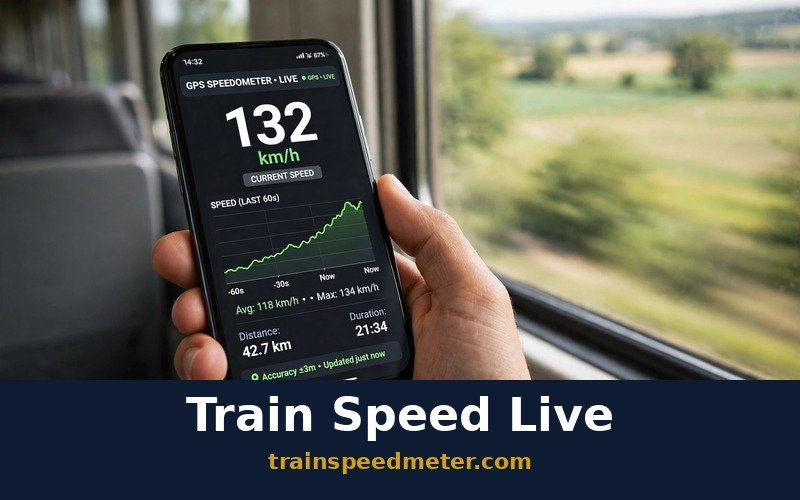
Train speed live means reading your train’s current speed in km/h while you travel, using your phone’s GPS. A live train speed meter works in a mobile browser: open it, allow location access, and the real-time train speed appears within 10 to 15 seconds. It needs no train number, no railway login, and no app. Because it measures your own phone’s movement, it shows the actual speed of the coach you are sitting in.
How Live Train Speed Works on a Phone
Your phone does not ask the railway how fast the train is going. It calculates that itself.
A GPS chip listens to signals from several satellites at once. By comparing the tiny timing differences in those signals, it works out where you are, and it does this many times a second. Speed comes from how far your position changes between readings. Many receivers also measure the Doppler shift in the satellite signal, which is the same effect that changes the pitch of a passing siren. This gives a smoother, more precise speed than position alone. The Global Positioning System was designed for exactly this kind of ground-speed measurement.
That is why a browser-based train speed live tracker can work anywhere. The train’s own instruments are separate. The loco pilot reads a speedometer driven by wheel sensors, and your phone is an independent second opinion.
According to the U.S. government’s GPS.gov performance data, a smartphone is typically accurate to within about 4.9 meters under open sky. Speed readings are usually much tighter than position readings, and that holds up on a train with a clear view of the sky.
How to Check Train Speed Live Online, Step by Step
The whole process takes under a minute. These are the steps I follow on a real journey:
- Turn on location. Switch on GPS or location services in your phone settings. Choose the high-accuracy mode if your phone offers one.
- Open the speed meter in your mobile browser. Use the train speed test page. Chrome, Safari, Firefox, and Samsung Internet all handle it well.
- Tap Start and allow location. The browser asks once. Allow it for the browser and for the page.
- Wait 10 to 15 seconds. The first reading needs time to lock onto satellites. Ignore any strange number during this period.
- Keep the screen awake. If the screen sleeps, many phones pause the browser’s location updates. Raise the screen timeout before a long run.
- Read the full set of numbers. Along with current speed, you get top speed, average speed, distance, and elapsed time. These tell you more than the live number alone.
On a station departure, I like to start tracking just before the train moves. You can watch the speed climb from zero, hold steady, and fall again at the next stop. It is a surprisingly good way to see how a journey is actually paced.
Getting an Accurate Live Train Speed Reading
GPS is excellent outdoors and weaker inside metal boxes. A train coach is a long metal tube, so small habits make a real difference.
- Sit by a window. The glass is the only gap in the coach roof and walls. A middle berth in an AC coach often gives a laggy reading, sometimes by several seconds.
- Hold the phone against the glass, or rest it on the window ledge. Tinted glass, common in AC coaches, weakens the signal more than clear glass.
- Compare readings over a few minutes. One second of data can jump. A steady stretch of readings is far more trustworthy.
- Expect zero in tunnels. There is no line of sight to satellites underground, so the speed drops to 0 and recovers on exit. This is a signal gap and does not mean the train stopped.
- Keep the phone away from metal shelves, power banks, and thick cases.
Treat the number as a very good estimate. Phone hardware, weather, tall buildings and power-saving modes can all shift it by a few km/h.
Live Train Speed in km/h, mph and m/s
Most Indian passengers think in km/h, but a good live train speed meter lets you switch units. These conversions are handy when you read a foreign report or compare against a different source.
| Speed in km/h | Speed in mph | Speed in m/s | What it feels like |
| 40 | 24.9 | 11.1 | Slow section near a station |
| 80 | 49.7 | 22.2 | Typical mail or express cruise |
| 110 | 68.4 | 30.6 | Fast express on a good track |
| 130 | 80.8 | 36.1 | Rajdhani or Shatabdi on a fast stretch |
| 160 | 99.4 | 44.4 | Vande Bharat or Gatimaan top speed |
To convert by hand, divide km/h by 3.6 for m/s, and multiply km/h by 0.62 for mph.
A Gatimaan speed test on the Delhi–Agra run is where you will actually see the 160 km/h row of this table.
How Fast Do Indian Trains Actually Run?
The speed on your screen only means something if you know what is normal. India’s network has a wide range, and the printed maximum is rarely what you see for long.
| Train type | Common top speed | Typical running speed | Notes |
| Vande Bharat Express | 160 km/h | 90 to 130 km/h | Fastest regular class on select routes |
| Gatimaan Express | 160 km/h | 100 to 140 km/h | Delhi to Agra corridor |
| Rajdhani and Shatabdi | 130 to 140 km/h | 70 to 110 km/h | Higher on upgraded sections |
| Superfast and Mail Express | 100 to 110 km/h | 60 to 90 km/h | Most long-distance journeys |
| Ordinary passenger | 60 to 90 km/h | 40 to 60 km/h | Frequent halts |
| Suburban and metro | 80 to 100 km/h | 30 to 50 km/h | Constant acceleration and braking |
The Vande Bharat Express is designed for higher speeds than most tracks can currently allow, so its everyday speed depends heavily on the route. You can see how each class behaves in practice on the Vande Bharat speed test, Shatabdi speed test, and Gatimaan Express speed pages.
Why Your Live Speed Never Matches the Timetable
Many people open a speed meter, see 94 km/h, and wonder why the timetable suggests something very different. They are measuring two different things.
A timetable speed is an average across a whole section, including stops, slow zones and signal waits. Your GPS speed is the value at this exact second. A train that touches 130 km/h can still average only 70 km/h across a trip, because it spends so much time accelerating, braking, crossing points and waiting for signals.
Curves, bridges, level crossings, station approaches and temporary speed restrictions all pull the live number down. This is also why the average speed shown by the tool is almost always far below the top speed.
A Shatabdi speed test shows this gap clearly — the train touches 130 km/h, but the trip average is far lower.
Train Speed Live vs Live Train Running Status
These are two different tools that people often mix up.
| Feature | Live train speed meter | Live running status |
| What it shows | Your current speed in km/h | Where the train is and how late it is |
| Data source | Your own phone’s GPS | Railway systems and station reports |
| Needs a train number | No | Yes |
| Works in a tunnel | No, signal drops | Yes, uses last station update |
| Best for | Curiosity, speed checks, comparing routes | Planning pickups and connections |
If you want to know whether your train is running late, check the running status. If you want to know how fast it is moving right now, use a train speed live tracker. Many travelers use both during one trip.
Who Uses a Live Train Speed Meter?
- Curious passengers who want to see if the Vande Bharat really hits 160 km/h on their stretch.
- Rail enthusiasts logging top speeds and average speeds across routes.
- Students and teachers using real motion data for physics lessons on speed, acceleration, and distance.
- Frequent commuters comparing how different services behave on the same corridor.
- Parents giving children a live experiment during a long journey.
- Content creators and bloggers who need a verifiable number for a travel video or article.
Pro Tips From Regular Use
- Start the meter before departure so the GPS is already locked when the train moves.
- Add the page to your home screen. It loads faster and uses less browser overhead.
- Carry a power bank on journeys over two hours, since GPS drains the battery faster than normal browsing.
- Use the max speed reading carefully. A single GPS spike can inflate it, so trust the value that repeats across several readings.
- Screenshot the result at the stretch you care about. The speed changes too quickly to note by eye.
- Do not hold the phone out of the window. It is unsafe, and the glass-side position gives the same signal.
Limits Worth Knowing
A browser speed meter is a great tool, and it is honest to say what it cannot do. It measures your phone’s movement and does not read the train’s official telemetry. It cannot guarantee the exact figure on the loco pilot’s display. Readings drop in tunnels, deep cuttings, and under large station roofs. Older phones with weak GPS chips can show a delayed or jumpy speed. Some browsers restrict location access, so if nothing appears, switch to a different browser and check that permission is granted to both the browser and the page.
None of these points make the tool unreliable. They simply mean you should read it as a sensible, real-world estimate rather than a laboratory instrument.
Check Train Speed Live Without Installing Anything
A browser-based live train speed meter removes most of the friction that apps create. There is no download, no account, no permissions list, and no storage cost. The speed calculation happens on your device, and your location is not stored when you use a privacy-first tool.
Once the page has loaded, the GPS work needs no mobile data at all, so it keeps working in patchy-network stretches where apps that rely on a server would fail. That is the real reason to prefer a browser tool for a single journey. If you plan to log many trips over time, a dedicated app may suit you better. For checking train speed live on any ordinary journey, the browser route is simpler and free.
Frequently Asked Questions
How can I check train speed live on my phone?
Open a live train speed meter in your mobile browser, turn on location, tap Start, and allow access. Wait 10 to 15 seconds for the GPS to lock. Your real-time train speed then appears in km/h, along with top speed, average speed, and distance for the trip.
Do I need an app to check train speed live online?
No. A browser-based tool works on any modern phone without installing anything. You open the page, allow location, and the speed shows up. An app only becomes useful if you want long-term trip history, saved logs, or a constant home-screen widget.
Is a live train speed meter accurate?
It is usually accurate within a few km/h when the phone has a clear view of the sky. Window seats give the best results. Tunnels, metal-heavy coaches, and weak phone GPS chips reduce accuracy, so compare readings over several minutes before trusting one number.
Does train speed live GPS work without internet?
Yes, after the page has loaded. The speed comes from satellites, not from mobile data, so it keeps updating in low-network areas. You need a connection only once to open the page. Adding it to your home screen helps it reopen quickly.
Why does my live train speed show 0 km/h?
The usual causes are switched-off location, denied permission, a tunnel, or a seat far from a window. Move closer to the glass, confirm location access for the browser and the page, and wait a few seconds. In a tunnel, the reading returns after the train exits.