
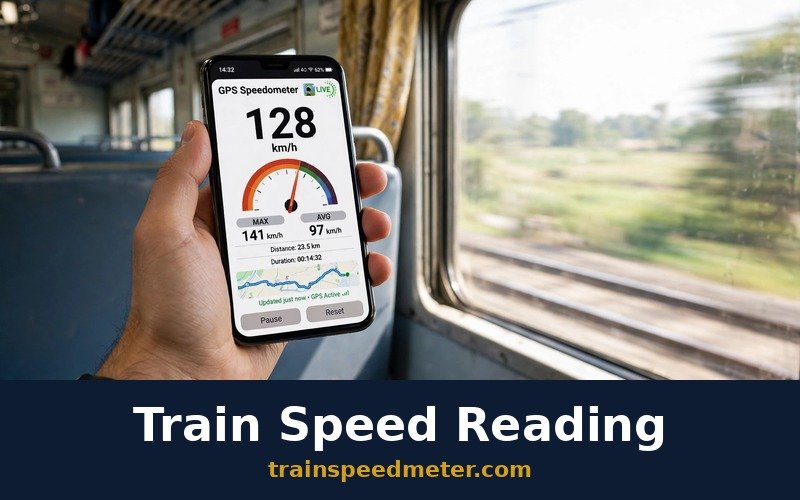
Train speed reading is the live km/h figure you get when your phone’s GPS tracks how fast your coach is moving. Open a train speedometer in your browser or use a train speed reading app, allow location, and keep the screen visible. GPS train speed reading works without mobile data once the page has loaded, and it updates in real time as the train accelerates, slows or crosses curves.
What a Train Speed Reading Actually Tells You
A train speed reading is an estimate of your phone’s ground speed, meaning how quickly your position is changing over the Earth’s surface. Because you are sitting inside the train, your phone’s speed and the train’s speed are effectively the same number.
It is not the train’s advertised top speed, and it is not a timetable calculation. A train that is “cleared for 160 km/h” will spend most of its journey well below that figure. It slows for stations, curves, level crossings, signals and speed restrictions. Your live reading captures all of that, second by second.
It also does not identify your train, show its route, or tell you whether it is running late. For delay and location information, you need a running-status service. A speed meter answers one question only: how fast am I moving right now?
How GPS Train Speed Reading Works
Your phone listens to signals from several navigation satellites. According to the Global Positioning System overview on Wikipedia, a receiver works out its position from the timing of those signals, and the same system can derive velocity.
There are two ways a phone can arrive at a speed:
Doppler measurement. The satellite signal’s frequency shifts slightly depending on how fast you move toward or away from it. Many receivers use this shift to calculate speed directly, which is why a modern phone can give a smooth reading even when its position is a few metres off.
Distance over time. If no direct speed value is available, software can compare two positions and divide the distance by the elapsed time.
Browser-based tools generally request whatever speed value the phone’s location system supplies and fall back to the distance method when it is missing. Good tools also discard poor location fixes, such as those with a wide error circle, rather than showing a wild number.
GPS needs no mobile data. Your phone receives satellite signals directly. The internet is only needed to load the web page or app in the first place, which brings us to the offline question.
How to Check Live Train Speed in km/h: Step by Step
Here is the routine that gives the most reliable result in practice.
- Switch on location services in your phone settings before the train leaves. Choose “precise” or “high accuracy” if your phone offers the option.
- Open the speedometer page at trainspeedmeter.com while you still have a data connection, so the page is fully loaded.
- Select km/h (or mph) with the unit switch.
- Tap Start and allow location when the browser asks.
- Wait for the train to depart. Starting before movement is fine, but the first readings can take a little time to settle.
- Keep the screen on and the page visible. Many phones pause web pages that are hidden or locked, so a reading can freeze if you switch apps.
- Hold the phone near a window or rest it on the sill. Glass lets satellite signals through far better than a metal roof does.
In practice, the first usable number often appears within half a minute. If you see a dash instead of a number, the tool has no fresh reading yet. A dash is not zero.
Train Speed Reading Without Internet
This is one of the most common worries, and the honest answer has two halves.
The speed measurement itself needs no internet. GPS satellites broadcast to your phone regardless of mobile coverage, so a train crossing a rural stretch with no signal can still produce a reading.
The page or app, however, has to be loaded before you lose coverage. If you open a web page in a dead zone, it will not load. The simple habit is to open the speed page at the station, tap Start, and then leave it running. A dedicated app installed on your phone avoids the issue altogether because it does not depend on a page loading.
One more trap: some phones switch off location when battery saver is on. If your reading disappears mid-journey, check that mode first.
Train Speedometer Reading vs Timetable Speed
People often compare their live number to what the timetable implies and think something is wrong. Nothing usually is.
A timetable gives planned departure and arrival times. Divide the distance by the time, and you get an average speed that already includes every stop and slow section. Your live reading is instantaneous. On a stretch of open track it may sit well above the timetable average, then fall to 30 km/h through a junction.
| What you’re looking at | What it represents | Changes during the trip? |
| Live GPS reading | Your speed at this second | Constantly |
| Timetable average | Distance divided by scheduled time | No |
| Maximum permitted speed | Highest speed allowed on that section | Changes by section |
| Advertised top speed | Design or marketing figure | No |
If you want to see how this plays out on specific services, the pages for the Vande Bharat speed test, Gatimaan speed test and Shatabdi speed test show how real journeys on those trains compare.
Typical Train Speeds and What to Expect on Your Reading
Speeds vary a great deal by route and by section. These figures are rough guides to what a live reading may show on open track.
| Train type | Typical running speed on open track | Highest speed on cleared sections | In mph (highest) |
| Local / passenger | 40–80 km/h | About 100 km/h | About 62 mph |
| Mail/express | 80–110 km/h | About 110–130 km/h | About 81 mph |
| Shatabdi / Rajdhani class | 110–130 km/h | Up to about 130–140 km/h on many routes | About 87 mph |
| Vande Bharat | 110–140 km/h | Up to 160 km/h on select sections | About 99 mph |
| Gatimaan Express | 130–150 km/h | 160 km/h on the Delhi–Agra stretch | About 99 mph |
| Shinkansen (Japan) | 240–300 km/h | Up to 320 km/h on some lines | About 199 mph |
| Metro | 40–70 km/h | Around 80 km/h | About 50 mph |
To convert by hand, multiply km/h by 0.621 to get mph. A reading of 100 km/h is about 62 mph. Going the other way, multiply mph by 1.609.
Your own reading will rarely match the highest column. If you see 160 km/h on a Vande Bharat or Gatimaan, you have caught it on one of the few sections cleared for that speed, and it is worth noting where you were.
A Gatimaan Express speed test on the Delhi–Agra run is the best place to catch that 160 km/h figure live.
How Accurate Is a Phone Speedometer on a Train?
Under open sky, phone GPS is quite good. The U.S. government’s GPS.gov accuracy page notes that smartphones are typically accurate to within about 5 metres in position under open sky. Speed estimates, especially Doppler-based ones, are usually steadier than position, and readings within a km/h or two of the true figure are common in good conditions.
What degrades it on a train:
- Metal coaches act like a partial shield, especially for seats away from windows.
- Tunnels and covered stations block satellites entirely.
- Deep cuttings and tall buildings reflect signals, adding noise.
- Older phones with weaker receivers give coarser readings.
- Browser handling differs between devices, so two phones side by side can disagree slightly.
There is no way to claim one accuracy figure for every phone and every train. Treat the reading as a strong estimate, not a calibrated instrument. If the number matters for a project or a school experiment, cross-check it against a second method, which the next section covers.
Pro Tips From Actually Using It on Trains
A few habits make a real difference.
Sit by the window, on the side facing open sky. In a crowded general coach, this is not always possible, but even a few seats closer to the glass can turn a flickering reading into a steady one.
Do not judge the number in the first 20 seconds. Early fixes are used to settle the signal. Give it a moment, especially after leaving a station roof.
Watch the number at different points. The most interesting pattern is how speed changes before and after a curve or a station approach. A train that eases from 110 down to 70 on a sweeping bend shows you something a timetable never will.
Note where you are when you see a peak. If you spot your highest speed, check the nearest station or landmark. This turns a number into a story.
Use it as a passenger only. Set up before the journey and keep your attention on staying safe near doors and platforms. A speed reading is never worth stepping toward an open door.
A Manual Cross-Check With Kilometre Posts
You can verify a GPS reading with nothing but a stopwatch. Indian railway lines have small kilometre markers beside the track, and many other networks use something similar, with mile markers in some countries.
Start timing as you pass one marker, stop at the next, and use this:
Speed (km/h) = 3600 ÷ seconds taken to cover 1 km
If it takes 30 seconds, you are doing 120 km/h. If it takes 24 seconds, you are doing 150 km/h. Because markers can be missed at speed, repeat it a few times and take the middle value. It is a nice experiment for students, and it gives you an independent figure to compare with your phone.
Browser Tool, App or Dedicated GPS Device?
Which route suits you depends on how often you travel and what you want to record.
| Option | Cost | Works offline once running | Records trips | Best for |
| Browser speedometer | Free | Yes, after the page loads | Usually not | Quick one-off checks |
| GPS train speed reading app | Free or paid | Yes | Often yes | Regular travellers and enthusiasts |
| Dedicated GPS receiver | Paid | Yes | Yes | Serious logging and projects |
| Dashboard or driver’s cab display | Not available to passengers | n/a | n/a | n/a |
For most passengers, a browser tool is enough. It needs no installation and no account, and it does the one job. If you travel often and want trip history, an app is worth the storage space. A dedicated receiver is overkill unless you are logging data for a project.
Who Uses Train Speed Reading, and Why
Curious passengers simply want to know how fast the Vande Bharat is going. It is a free, satisfying bit of travel entertainment.
Students and teachers use it for physics lessons on speed, acceleration and unit conversion. Pairing it with the kilometre-post method makes a good practical.
Rail enthusiasts compare how different classes of trains behave on the same section, and record the highest speeds they catch.
Parents often use it to keep children occupied on long journeys, turning a boring stretch into a game of guessing the next peak.
Travel bloggers and video makers film the screen as proof of speed on a notable service.
A Shatabdi speed test is a good first check for new users, since the service runs at a steady 110–130 km/h on most routes.
Common Problems and Quick Fixes
The reading shows a dash. The tool has no fresh signal. Move closer to a window and wait.
It says location is blocked. Allow location for the site in browser settings and in your phone’s system settings, then retry.
The number froze. The page was probably paused when the screen locked or the tab was hidden. Return to the page and resume.
The speed seems low. Check which unit is selected. A figure of 62 in mph is the same as 100 in km/h.
Two phones disagree. Small differences are normal. A gap of more than a few km/h suggests one phone has a poor signal.
It reads zero in a tunnel. That is not true zero. Satellites are blocked, so the reading is unknown. Wait for the train to emerge.
Frequently Asked Questions
How do I check train speed reading live on my phone?
Open a train speedometer page in your phone’s browser, tap Start, and allow location. Keep the screen on and sit near a window. Your live speed in km/h or mph appears within a short while and updates continuously. No train number or account is needed, because the reading comes from your phone’s GPS, not from railway records.
Does a GPS train speed reading app work without internet?
Yes, the GPS measurement does not need mobile data, because your phone receives satellite signals directly. The app or page must be loaded first. Open it at the station or while you still have coverage, then leave it running. An installed app is the safest choice for routes with long coverage gaps.
What is a normal train speed reading in km/h?
It depends on the train and track. Local trains often run 40–80 km/h, mail and express services 80–110 km/h, and premium trains like Shatabdi or Vande Bharat can reach 130–160 km/h on cleared sections. Your reading drops for stations, curves, and restrictions, so expect it to move a lot during the trip.
Why does my train speedometer reading show zero or a dash?
A dash means the tool has no fresh signal, which is common in tunnels, covered stations or when the screen was locked. A true zero means the phone is reporting no movement. Move near a window, make sure location is allowed, and wait a few moments for a new fix.
Is real-time train speed reading accurate?
In open conditions, it is usually close, often within a km/h or two, though this varies by phone, browser, and train. Metal coaches, tunnels and deep cuttings reduce accuracy. Treat it as a reliable estimate rather than a calibrated measurement, and cross-check with kilometre posts if precision matters.