
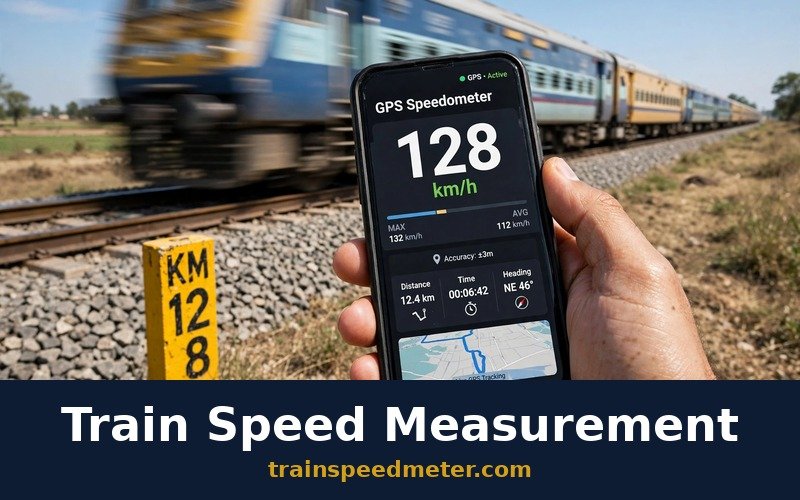
Train speed measurement is the process of working out how fast a train is moving, either from inside the coach or from beside the track. The easiest way to measure train speed today is a GPS speedometer on your phone, which reads speed from satellite signals and updates every second. Railways rely on wheel sensors and onboard computers instead, while trackside observers time the train between two kilometre posts and divide distance by time.
How Train Speed Measurement Works
Every method comes down to one relationship: speed equals distance divided by time. The difference between methods is where the distance and the time come from.
There are three families:
- Onboard instruments. Sensors on the wheels or axles count rotations. The locomotive’s computer converts those into a speed shown to the driver and stored in the event recorder.
- Trackside observation. A person or a radar unit measures the train as it passes a fixed point or a known stretch of track.
- Satellite positioning. A receiver, usually the one already inside your phone, calculates speed from signals sent by GPS satellites.
For passengers, the third family is the practical one. You do not need access to the cab, the track or the railway’s data. You need a phone, a window and a few seconds.
How to Measure Train Speed with GPS on Your Phone
Train speed measurement using GPS works because your phone does not guess speed from where it was a moment ago. A GPS receiver can read velocity from the Doppler shift in satellite signals. This is the same effect that makes a passing siren change pitch, and Wikipedia’s explanation of the Doppler effect covers the physics. That is why a train’s speed can look steady even when the position dot on a map wobbles.
Here is the routine that works reliably:
- Switch on location services and set them to high accuracy or GPS mode, not “battery saving”.
- Open a browser-based GPS speedometer or a train speedometer app.
- Tap start and allow location access. Allow it for both the browser and the page itself. Skipping one of the two is the most common reason a reading stays at zero.
- Move to a window seat if you can. Side seats near glass see more sky than aisle seats.
- Wait 10 to 15 seconds. The first readings after a cold start are the least trustworthy.
- Read the speed, then watch the trend. A reading that climbs smoothly out of a station is healthy. One that jumps between 0 and 90 is a signal problem.
According to the U.S. government’s GPS performance data, a smartphone is typically accurate to within about 5 metres under open sky, and accuracy worsens near buildings, bridges and trees. A moving train is usually in open country, so the speed figure tends to be solid in practice. It is the stretches with a poor sky view that cause trouble.
A real-time train speed tracker is useful for more than curiosity. Because it logs current, maximum and average speed together, you can see exactly how the run is behaving, rather than relying on the printed timetable.
Browser Speedometer or Train Speed Measurement App?
Both use the same phone GPS chip, so raw accuracy is similar. The difference is convenience, battery use and what you can store.
| Feature | Browser-based speedometer | Installed speedometer app | Kilometre-post timing |
| Install needed | No | Yes | No |
| Internet needed | Only to load the page | Usually only for first install and ads | No |
| Works in tunnels | No | No | Yes, if you can see posts |
| Typical accuracy | Very good in open sky | Very good in open sky | Moderate, depends on your timing |
| Trip history and logs | Limited | Often included | Manual |
| Battery impact | Moderate | Moderate to high | None |
| Best for | Quick checks, borrowed phones | Long journeys, record keeping | No signal, no data, low battery |
A browser tool is the lowest-effort option when you simply want to know how fast the train is going. A dedicated train speedometer app earns its place if you ride often and want saved trips or a larger display. If you are choosing between apps, check three things before relying on one: whether it asks for more permissions than location, whether it shows GPS accuracy on screen, and whether it keeps working with the screen dimmed.
How to Measure Train Speed Without GPS or Internet
You can measure train speed with nothing but a stopwatch. The method is old, simple, and surprisingly accurate if you are careful.
Find two fixed markers a known distance apart. Kilometre posts are ideal: the small numbered stones or boards beside the track. Start the timer as the front of the train passes the first post and stop it at the second. Then use:
Speed (km/h) = 3600 ÷ seconds taken for one kilometre
For a different distance, multiply the distance in kilometres by 3600 and divide by the seconds taken.
| Seconds per kilometre | Speed |
| 60 | 60 km/h |
| 45 | 80 km/h |
| 36 | 100 km/h |
| 30 | 120 km/h |
| 27.7 | 130 km/h |
| 22.5 | 160 km/h |
A worked example: you time 1.5 km in 54 seconds. Multiply 1.5 by 3600 to get 5400, then divide by 54. The train was moving at 100 km/h.
Two habits improve accuracy. Time across at least two kilometres where you can, because a single kilometre at 120 km/h lasts only 30 seconds, so a half-second reaction delay already shifts the result noticeably. And always sit at the same point in the coach for both readings, since the front of a long train passes a marker well before the rear does.
Any online train speed calculator does the same arithmetic. It is worth knowing the formula anyway, for the day you have no signal.
Model trains
The same logic works on a layout. Time how long a model takes to cross a measured length of track, then multiply by the scale ratio. If an HO (1:87) model covers 1 metre in 2 seconds, it moves at 0.5 m/s. Multiply by 87 to get a scale speed of 43.5 m/s, or about 157 km/h. This is why a model that looks slow on a table can represent a very fast real train.
How Railways Measure Train Speed Onboard
Rail operators do not use GPS as their primary source. They use hardware that works in every tunnel, cutting and station roof.
- Wheel or axle sensors. A tachogenerator or pulse sensor counts rotations. Multiplied by the wheel circumference, this gives distance and speed, much like a car’s speedometer.
- Radar and Doppler units. Mounted under the locomotive, these measure speed against the track itself, which helps when wheels slip or slide.
- Event recorders. The speed trace is stored so investigators can review a run afterwards.
- Signalling and train protection. Automatic systems compare actual speed with the permitted speed and apply brakes if the limit is exceeded. Track-mounted beacons give the system fixed position checks.
Wheel-based measurement has one weakness. Wheels wear down, and a smaller wheel covers less ground per rotation, so the sensors must be recalibrated. That is why operators combine several sources instead of trusting a single reading.
Why Your Reading Never Matches the Timetable
A phone reading and a timetable are answering two different questions. This surprises many first-time users.
- Current speed is what the train is doing right now.
- Maximum speed is the peak reached during the trip.
- Average speed is total distance divided by total time, including stops, slowdowns and waiting at signals.
- Sectional speed is the maximum permitted on a given stretch of track, set by curves, gradients, bridges and the condition of the line.
A train that touches 130 km/h can still average 70 km/h across the whole journey, because it brakes for stations, crawls through speed restrictions and waits at red signals. When your phone shows 95 km/h on a train that is advertised as a 130 km/h service, nothing is wrong. You are probably on a section with a lower limit.
A Shatabdi Express speed test shows this clearly: the service is advertised at 130 km/h, but the live reading on a restricted section is often much lower.
Typical Speeds You Will See on Indian Trains
These are indicative figures. Actual limits vary by route and track condition.
| Train type | Typical maximum on cleared sections | Typical average |
| Vande Bharat Express | Up to 160 km/h on a few sections, 130 km/h on many | 80 to 95 km/h |
| Gatimaan Express | 160 km/h (Delhi to Agra) | About 90 to 100 km/h |
| Rajdhani and Shatabdi | 130 to 140 km/h | 70 to 90 km/h |
| Superfast Express | 110 to 130 km/h | Above 55 km/h |
| Mail and Express | 100 to 110 km/h | 45 to 55 km/h |
| Ordinary passenger | 80 to 100 km/h | 30 to 40 km/h |
The Vande Bharat Express was designed for higher speeds than most of the track can currently allow, so you may see well under its design maximum on many routes. If you are riding one of these services, the Vande Bharat, Shatabdi and Gatimaan speed test pages on train speed meter give you a live check from your browser:
Vande Bharat speed test
Shatabdi speed test
Gatimaan speed test
What Throws Off a Train Speed Reading
Most bad readings come from the phone’s view of the sky, not from the method.
- Tunnels and underground sections. There is no satellite signal, so the reading drops to zero or freezes at the last value. It recovers once the train exits.
- Steel bridges and deep cuttings. The signal bounces off metal or is blocked, which causes brief spikes and dips.
- Metal-heavy coaches. Fully enclosed coaches with coated glass reduce signal strength. A window seat helps noticeably.
- Battery saver mode. Many phones throttle location updates to save power. The speed then updates in slow, jerky steps.
- A fresh start. The first 10 to 15 seconds are the least stable. Ignore them.
- Permission mismatch. Browser permission is on but page permission is off, or the reverse. Check both.
- Indoor or station roof starts. Wait until the train is outside and moving before judging accuracy.
Pro tips:
- Keep the phone face up near the window, not in a pocket or bag.
- For journeys over two hours, bring a power bank, because continuous GPS use drains the battery faster than normal browsing.
- Cross-check one reading with the kilometre-post method early in the trip. If the two agree within about 5 km/h, you can trust the phone for the rest of the run.
- Read the trend, not a single number. A stable 5-second average is far more reliable than one instant.
Who Uses Train Speed Measurement
The same readings serve very different people:
- Everyday passengers check whether the service is running at its usual pace and satisfy their curiosity about top speed.
- Railfans and photographers record peak speeds on specific routes and compare services.
- Physics teachers and students use a train ride as a live example of speed, acceleration and average versus instantaneous speed.
- Travel writers and content creators back up claims about a service with an actual measured figure.
- Model railway builders convert model speed to scale speed and check that their layout feels realistic.
- Commuters on metro lines use it to see how station spacing affects average speed.
Choosing the Right Way to Measure Train Speed
The right train speed measurement method depends on what you have in hand. With a signal and a window seat, GPS gives a live, second-by-second reading. Without a signal, the kilometre-post stopwatch method still delivers a figure you can trust to within a few km/h. For a deeper look, compare the maximum, the average and the posted sectional limit, rather than a single number on the screen.
Start with a short run on a train you know. Take one GPS reading and one stopwatch reading, compare them, and you will quickly learn how far to trust each in your own conditions.
Try it on a fast service first — a Gatimaan Express speed test on the Delhi–Agra run, where open track gives GPS a clear view of the sky.
Frequently Asked Questions
How can I measure train speed on my phone?
Turn on location, open a GPS speedometer page or a train speedometer app, and allow location access. Sit near a window and wait 10 to 15 seconds for the signal to settle. The screen then shows your current speed, and many tools also show the maximum and average for the trip.
Is a train speed measurement app accurate?
In open country, yes. Phones use satellite signals directly, and speed is calculated from the Doppler shift rather than from successive positions. Accuracy falls in tunnels, under steel bridges and inside metal-heavy coaches. A window seat and a few seconds of patience make the biggest difference to the result.
Does train speed measurement using GPS work without internet?
The GPS chip does not need mobile data, because it talks to satellites directly. A browser tool does need data to load the page once. After that, it can keep calculating speed without a connection. An installed app works offline from the start.
How do I calculate train speed with a stopwatch?
Time the train between two kilometre posts and divide 3600 by the seconds taken for one kilometre. If it takes 36 seconds, the train is doing 100 km/h. For longer distances, multiply the distance in kilometres by 3600 and divide by the seconds.
Why does my train speedometer app show 0 km/h?
The signal has probably been lost. Tunnels, deep cuttings, and enclosed coaches block satellites. It can also mean location permission is missing for the browser or the page, or that battery saver mode is limiting updates. Move to a window and wait for a fresh fix.