
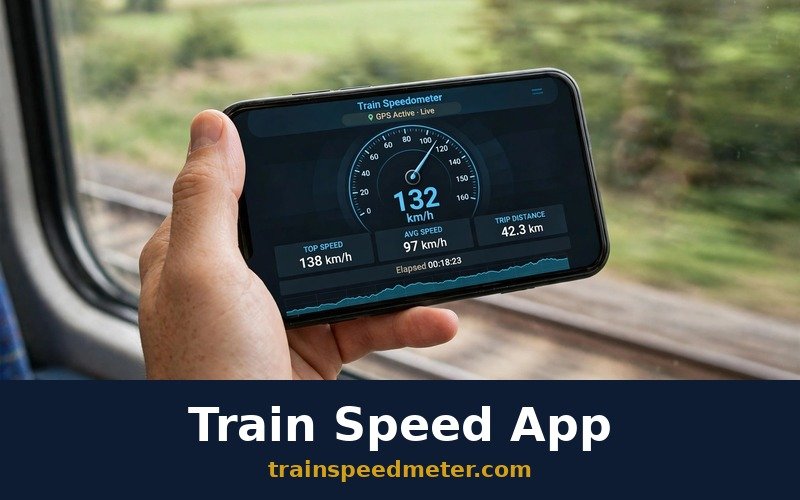
A train speed app uses your phone’s GPS receiver to show how fast a train is moving at this moment. Train speedometer apps and browser-based GPS train speed meters work the same way: they read location updates, calculate ground speed, and display it in km/h or mph. The reading is an estimate, strongest with a clear view of the sky, and it can drop out in tunnels, covered stations, and dense urban sections.
How a Train Speed App Actually Works
Your phone does not know anything about the train. It has no link to the locomotive, the signaling system, or the onboard display. All it knows is where it is, and how that position changes.
Every GPS receiver listens to timing signals from several satellites. According to the official GPS.gov accuracy page, a modern smartphone is typically accurate to within about 4.9 metres under open sky. Speed comes from that same data in one of two ways.
The first method uses Doppler shift. When you move toward or away from a satellite, the frequency of its signal changes slightly, and the receiver converts that change into velocity. This is usually smooth and responsive. The second method is simple arithmetic: the app takes two position fixes, measures the distance between them, and divides by the time between the fixes. It works, but it is noisier, especially when fixes are imprecise.
Browsers hand you a ready-made speed value when the phone provides one. When they don’t, a well-built tool falls back to the distance-over-time method and ignores position fixes with large error circles. That filtering step is what separates a trustworthy train speed tracker from a jumpy one.
What this means for you as a passenger: the number on the screen is the phone’s speed over the ground. It is not the train’s rated top speed, and it is not a timetable figure.
Train Speed App vs. Browser-Based Speed Meter
Both options measure the same thing. The difference is convenience.
An installed app can record trips, run in the background, and store history. A browser tool opens instantly, needs no storage space, and works on any phone with a modern browser. If you only want a quick answer to “how fast are we going right now?”, the browser route is usually faster. If you want a log of top speed and average speed across a long journey, an installed app is the better fit.
| Feature | Installed Speedometer App | Browser-Based Speed Meter |
| Installation | Required | None |
| Setup time | Minutes (download, permissions) | Seconds |
| Offline use | Often supported | Needs the page loaded first |
| Trip history | Usually yes | Usually limited to current session |
| Background tracking | Often yes | Page generally must stay visible |
| Storage used | 8 MB and up | None |
| Unit options | km/h, mph, knots, m/s | Typically km/h and mph |
| Best for | Frequent riders, record keepers | Curious one-time checks |
How to Check Your Train’s Speed: Step by Step
The process takes less than a minute once you know the order. Do it while seated, and keep your attention on the journey rather than the screen.
- Switch on location. Turn on GPS or location services in your phone settings. Choose the high-accuracy or precise-location option if your phone offers one.
- Pick your seat wisely. A window seat helps. Metal coaches weaken satellite signals, and a clearer view outside gives the receiver more to work with.
- Wait until the train is moving. Opening the tool at the platform is fine, but a meaningful reading only appears once the train pulls away.
- Open the speed meter and allow location access. Tap Start and accept the permission prompt. If you accidentally deny it, you will need to re-enable it in browser or app settings.
- Give it time. The first few fixes mostly help the receiver settle. Expect 10 to 15 seconds before the number stabilises.
- Keep the screen on. Many browsers pause location updates when the tab is hidden or the screen locks. If the reading freezes, bring the page back and resume.
- Choose your unit. Switch between km/h and mph depending on what you are used to. For reference, 100 km/h equals about 62 mph.
You can try this directly with a live train speed meter that runs in your phone’s browser.
Real-World Examples: What Speeds Should You Expect?
Seeing a number is more satisfying when you know what it means. Here is what typical services tend to show.
Indian intercity services
Premium trains are where most passengers get curious. A Shatabdi Express speed test will usually show a steady cruise somewhere in the 110–130 km/h range on good track, with brief higher readings on cleared sections. The Delhi–Agra Gatimaan Express is rated for 160 km/h on its route, and a Gatimaan Express speed test is the best way to see how much of that run actually gets used. Newer semi-high-speed sets are covered on the Vande Bharat speed test page. According to Wikipedia’s overview of the Vande Bharat Express, the trains are designed for 180 km/h but run at lower operational limits because of track conditions.
High-speed rail abroad
Japan’s Shinkansen and France’s TGV can sustain well over 250 km/h for long stretches. The Shinkansen is where many people first notice how smooth the ride looks. A phone at a window seat tends to hold a signal well on elevated and open sections, then lose it in the long tunnels that punctuate the route.
Metro and suburban trains
These are different. Stops come every couple of minutes, so you will see rapid climbs to 60–80 km/h followed by braking. The peak looks impressive, but the average speed across the whole line is much lower.
Why Your Reading Changes (and Why That Is Normal)
New users often assume a speed meter should show one steady number. Real trains do not behave that way.
A train slows for curves, signals, level crossings, bridges, and temporary speed restrictions. It brakes into stations and accelerates out of them. Even on a long straight stretch, drivers ease off and re-apply power. In practice, the live number on a train speed checker app wobbles by a few km/h constantly, and that is exactly what you should see.
Live speed versus timetable speed
A timetable tells you the planned time between stops. Divide the distance by that time, and you get an average, which includes slow starts, station dwell, and restricted sections. A railway speed calculator works the same way: it takes a known distance and a known time and returns an average.
Live GPS gives you the opposite view. It shows the instantaneous speed, so a train advertised as “fast” can show 60 km/h while passing a congested approach and 140 km/h minutes later. Neither number is wrong. They answer different questions.
The Gatimaan Express speed test shows how much of a 160 km/h rating actually gets used on the run.
Quick way to calculate average speed yourself
If you know the distance between two stations and the time you took, divide distance by time. A 200 km leg covered in 2 hours is an average of 100 km/h, even if the train touched 130 km/h at its peak. Comparing this figure with the maximum on your speed tracker shows how much of the trip was spent accelerating, braking, or crawling.
Getting Accurate Readings: Pro Tips
Accuracy depends more on conditions than on which app you pick. These habits make the biggest difference.
- Sit by the window, not the aisle. Modern coaches are largely metal. Even a few feet closer to the glass can improve reception.
- Avoid pressing the phone against a metallic surface. Tray tables and seat frames can interfere with the antenna.
- Start the tool before you need it. Letting the receiver lock while the train is at a station avoids a slow first reading.
- Don’t trust the first few seconds. Early readings are often noisy as the receiver converges on a position.
- Use a power bank on long journeys. GPS uses more power than ordinary screen use, and an overnight trip can drain a phone faster than expected.
- Compare against known markers. If your route has kilometre posts, timing how long it takes to pass two of them gives a rough sanity check on the displayed speed.
- Switch off battery saver. Aggressive power-saving modes can throttle location updates and give laggy readings.
Where GPS Speed Tracking Falls Short
An honest guide has to cover the limits, because that is where most frustration comes from.
Tunnels and underground sections. Satellite signals do not penetrate rock, so underground stretches produce no usable reading. A well-designed tool shows a dash or “no signal”, not zero. A missing reading does not mean the train stopped.
Covered stations and dense cities. Tall buildings reflect signals, which can produce position errors and sudden jumps. Cuttings and deep valleys cause similar trouble.
No train identity or schedule data. A speed meter does not know which train you are on, where it is on the timetable, or whether it is running late. For live running status you need a separate railway information service.
No calibrated accuracy figure. There is no universal accuracy number for all phones and all trains. Treat each reading as a good estimate, not a certified measurement. If you want the official picture of how well consumer receivers perform in open conditions, the GPS.gov performance data linked earlier is the right reference.
Battery cost. Continuous positioning is one of the heavier tasks a phone does. Plan for it.
A Brief Look at How Train Speed Used to Be Measured
Before passengers carried satellite receivers, speed came from instruments tied to the train itself. Drivers relied on mechanical speed recorders linked to axle rotation, and railways later added wheel sensors, trackside timing points, and electronic train control. Passengers, meanwhile, estimated speed the old-fashioned way: counting rail joints or timing kilometre markers against a watch.
That context explains why phone-based measurement feels almost magical. What once needed dedicated equipment now fits in a pocket. It also explains the limits. A phone sees the train from the outside, through satellites, while onboard instruments measure the wheels directly. When the two differ slightly, as they often do, neither is “wrong”. They are measuring different things. For a wider look at how fast rail has become worldwide, Wikipedia’s article on high-speed rail gives a solid overview of the services that regularly run above 250 km/h.
Who Benefits Most from a Train Speed App
Different riders want different things from the same tool.
- Curious commuters. If you take the same line daily, watching the speed profile reveals where the route slows, which sections are fast, and why your journey takes as long as it does.
- Rail enthusiasts. Hobbyists log top speeds, compare services, and verify claims about operational limits. A trip logger with maximum and average speed is the feature they care about. A Shatabdi Express speed test is the kind of steady-cruise reading they log to compare services.
- Parents and teachers. Speed is a hands-on way to teach distance, time, and velocity. A child watching the number climb as a train leaves the station learns more than a textbook diagram offers.
- Tourists on scenic or high-speed routes. Riding a bullet train and seeing 280–300 km/h on your own screen is a memorable part of the trip.
- Travel bloggers and video creators. A clean speed reading on a window-seat shot adds credibility to a journey video.
- Long-distance passengers. People on overnight services use average speed to estimate arrival time, though a railway app is better for official running status.
Choosing the Right Train Speedometer App
Before you pick, decide what you actually want.
If you want a one-off reading, use a browser-based GPS train speed meter and skip the install. If you ride often and like records, choose an installed app with trip history, average and maximum speed, and offline support. Look for these traits:
- Multiple units. km/h and mph at a minimum, ideally m/s and knots too.
- Clear signal feedback. The app should tell you when it has no usable fix instead of displaying a misleading zero.
- Reasonable permissions. A speedometer needs location. It does not need your contacts or camera.
- Battery-aware design. Smart update intervals matter on long rides.
- Honest pricing. Free tools are plenty for basic use. Paid tiers typically add history, alerts, and extended logs.
Whichever you choose, test it on a short local ride first so you know how it behaves before an important journey.
Safety, Privacy and Etiquette
Use the tool while seated. Standing in a moving coach while looking at a phone is an easy way to lose balance, and it is never worth it for a number on a screen.
On privacy, check how the tool handles your location. Reputable browser tools process the reading on your device and do not need an account. If an app asks for more than location access, question why.
Finally, remember that you are among other passengers. Keep brightness reasonable on night services and avoid holding your phone against the window in a way that blocks someone’s view.
Frequently Asked Questions
Can I check my train’s speed with a phone app?
Yes. Any train speed app or browser tool that reads your phone’s GPS can show your live speed in km/h or mph. It works best above ground, near a window, and after the train has started moving. The number reflects your phone’s movement, so it is an estimate rather than the train’s official figure.
Does a train speedometer app work without internet?
Mostly yes. GPS positioning relies on satellites, not mobile data, so the speed calculation keeps working without a signal. A browser-based tool needs internet once to load the page. An installed app usually works fully offline after you set it up.
Why does my train speed tracker show zero in a tunnel?
Satellite signals cannot reach underground, so the receiver has nothing to calculate from. Good tools show a dash or “no signal” instead of a real zero. The reading comes back on its own after the train exits, usually within a few seconds of regaining a view of the sky.
How accurate is a GPS train speed meter?
In open conditions, it is usually close enough for passenger curiosity, since smartphones typically fix position within a few metres. Accuracy falls in tunnels, cuttings, and covered stations. There is no single precision figure for every phone and train, so treat readings as good estimates.
Is a real-time train speed reading the same as the timetable speed?
No. Real-time train speed shows how fast the train is moving at this instant, while timetable speed is an average across a section, including stops and slow zones. A train can touch 130 km/h and still average 90 km/h over the whole journey.