
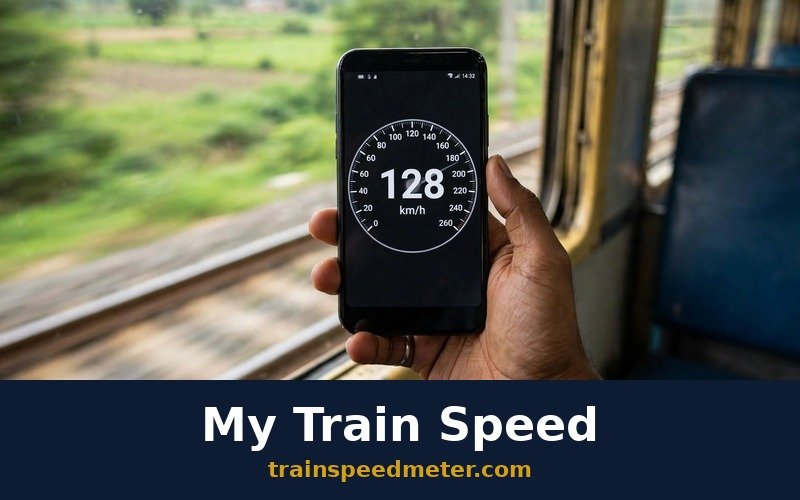
My train speed is the live ground speed of the coach you’re sitting in, and you can read it in under a minute. Open a GPS-based speedometer in your phone’s browser, allow location access, and tap Start. Your phone compares satellite position fixes and shows your current speed in km/h, plus maximum and average speed. You don’t need an account, a train number, or a download. Sit near a window for better signal, and expect brief gaps in tunnels.
How Your Phone Calculates My Train Speed in km/h
Your phone has no connection to the train’s wheels, engine, or signalling system. It works out speed on its own, from satellites.
The Global Positioning System is a constellation of satellites that continuously broadcast timing signals. Your phone’s receiver listens to several of them, calculates where it is, and repeats that calculation every second or so. Train Speed comes from the change in position over time. Many receivers also use the Doppler shift in the satellite signal, which gives a smooth speed estimate that doesn’t depend on drawing a line between two dots on a map.
Browser-based tools use your phone’s location service through the browser’s Geolocation feature. The browser hands over a position and, on many devices, a speed value. When no speed is supplied, a good tool divides the distance between two reliable position fixes by the time between them. Fixes with a wide error radius should be discarded, which is why the first few seconds after you tap Start can look blank. The tool is waiting for a trustworthy signal, not malfunctioning.
According to the official U.S. government GPS site, smartphone GPS is typically accurate to within about 4.9 metres under open sky. Speed estimates are generally steadier than position, because small position errors mostly cancel out when you measure change over a few seconds.
How to Check My Train Speed Online, Step by Step
Here’s the process that works on most Android phones and iPhones:
- Wait until the train is moving. Starting at the platform gives you a string of zeros and a misleading average. Begin once the train has pulled out.
- Open a browser-based speedometer. The train speed meter runs in Chrome, Safari, Firefox, or Samsung Internet without installation.
- Turn on device location. Use the High accuracy or Precise location setting. Battery-saver location modes often return rough readings.
- Tap Start and allow permission. Allow location for both the browser and the website; otherwise, the reading never begins.
- Wait 10–15 seconds. The first reading needs a few clean fixes. Hold the phone steady or rest it on the window ledge.
- Choose your unit. Switch between km/h, mph, and m/s. Indian passengers usually want km/h.
- Keep the screen awake. Many phones pause the browser’s location updates when the screen locks, so keep the tab visible.
Pro tip: set everything up while the train is still at the station, then tap Start when it begins to roll. You’ll avoid fumbling with permission pop-ups while moving.
Browser Tool or My Train Speed App? A Practical Comparison
People searching for a My Train Speed app are usually deciding between installing something and just using a webpage. Both work. The difference is in the extras.
| Feature | Browser-based tool | Installed speedometer app |
| Installation | None | Download from the Play Store or App Store |
| Storage use | Almost none | 10–60 MB typically |
| Works on any phone | Yes, with a modern browser | Depends on the OS version |
| Trip history | Limited to the session | Often saved long-term |
| Background tracking | Weak; the tab must stay visible | Better, but uses more battery |
| Ads and permissions | Fewer permissions | May request contacts or storage |
| Offline use | Needs a first page load, then GPS works with no data | Works offline once installed |
| Best for | Quick checks, one-off journeys | Frequent travellers who want logs |
If you ride once in a while and want an answer now, the browser route is quicker and leaner. If you log every journey for a hobby or a blog, an installed app makes sense. Whichever you pick, read the permission list before you install.
What GPS Train Speed Looks Like on Indian Services
A live reading is more interesting when you know what to expect. Typical top speeds on cleared sections look like this:
| Service type | Typical running speed | Notes |
| Passenger / local | 50–90 km/h | Frequent stops and speed restrictions |
| Mail / Express | 90–110 km/h | Higher on long straight stretches |
| Rajdhani / Duronto | 110–140 km/h | Sustained cruising between halts |
| Shatabdi | Up to about 130–150 km/h | Limited to cleared corridors |
| Gatimaan Express | Up to 160 km/h | Delhi–Agra section |
| Vande Bharat | Up to 160 km/h in service | Designed for higher speeds, but track limits apply |
These are indicative, not guarantees. A train’s permitted top speed depends on the track section, signalling and rolling stock. What you see on your phone is the speed at this moment. If you’re curious how specific premium services behave, the Vande Bharat speed test, the Shatabdi speed test and the Gatimaan Express speed test pages look at each in detail. Indian Railways’ own description of the Vande Bharat Express notes the gap between design speed and operating speed, which is exactly what a live reading makes visible.
Why My Train Speed Differs From the Timetable
This surprises people more than anything else. The timetable says a train covers 300 km in four hours, so you expect 75 km/h. Your phone shows 128 km/h. Neither is wrong.
A timetable’s average includes everything: acceleration out of stations, braking into them, scheduled halts, slow zones at junctions, and pathing around other trains. Your phone shows only the instant. A train that cruises at 130 km/h for an hour and then crawls through a congested yard can still deliver a modest average.
In practice, the most useful comparison is peak against average. Note the maximum speed your phone recorded and the average at the end of the segment. A large gap tells you the route is stop-heavy or restricted. A small gap suggests a clean, fast corridor.
Getting a Cleaner Reading: Insider Tips
- Window seat, phone near the glass. Metal-bodied coaches act like a partial shield. Even a few centimetres closer to the window helps.
- Avoid pockets and bags. A phone buried in a backpack on the luggage rack gets weak, noisy fixes.
- Use precise location, not battery saver. This single setting causes more bad readings than any other.
- Don’t switch apps constantly. Browsers may throttle location updates for hidden tabs.
- Let it settle. The first 10–15 seconds are calibration. Judge the reading after that.
- Sample at several points. One reading near a station tells you little. Check on open straight track, where the train is likely at cruising speed.
- Carry a power bank on long runs. Continuous GPS uses noticeably more battery than passive browsing.
Why My Train Speed Shows Zero, Freezes or Jumps
Most problems come down to signal, not the tool.
Tunnels and underground sections. Satellite signals don’t reach underground. A properly built tool will show a dash or zero and recover once you exit. Zero in a tunnel doesn’t mean the train stopped.
Deep cuttings and covered stations. Walls and roofs block part of the sky. Expect dips near big terminals.
Permission mismatch. If the browser has location access but the website doesn’t (or the reverse), nothing happens. Tap the lock icon beside the address bar and allow location.
Location services off. The phone’s master switch has to be on, not only the browser permission.
Weak or delayed fixes. Dense city corridors cause multipath errors, where signals bounce off buildings. The reading may jump by a few km/h before it settles.
Browser quirks. If one browser misbehaves, try another. Chrome and Safari generally behave best.
How Accurate Is a Phone-Based Train Speedometer?
Honestly: very good for a free tool, but not a certified instrument. Under open sky with good reception, readings typically land within a few km/h of true ground speed. Accuracy falls in tunnels, narrow cuttings, covered platforms, and metal-heavy coaches.
It also isn’t the same as the number a loco pilot sees. Railway locomotives use dedicated speed-measuring equipment tied to axle rotation, and those readings can differ slightly from GPS because of wheel wear and calibration. Treat your phone’s figure as a reliable estimate for curiosity, comparison, and journey notes, and never as an official record.
A Short History of Measuring Train Speed
Before satellites, speed was measured mechanically. Early locomotives carried dials driven by axle rotation, and recorders drew speed traces onto paper so inspectors could review a driver’s run afterwards. Trackside timing between fixed markers gave a second method: measure the time over a known distance and calculate speed. Later electronic train-control systems took the measurements from wheel sensors and radar.
Passengers had none of this. The only way to estimate speed was the old trick of counting rail joints or kilometre posts against a watch. GPS changed that by putting a speed reading in everyone’s pocket, with no cooperation from the operator.
Who Uses Live Train Speed Readings
- Curious commuters who want to know how fast the Vande Bharat or Shatabdi really goes.
- Rail enthusiasts logging peak speeds across routes and comparing classes.
- Students and teachers using a live journey for physics lessons on velocity, acceleration, and average speed.
- Travel bloggers and YouTubers who add credible speed figures to their trip content.
- Families with children, for whom a live number turns a long ride into a game.
- Route comparers who check how different services handle the same corridor.
Speed, Running Status and PNR Are Different Things
Many people searching for their train’s speed actually want something else. A speedometer shows how fast your phone is moving. It doesn’t identify the train, show its position on the route, or tell you whether it’s late. For delays, you want a live running status service. For your seat and booking, you need your PNR status.
If you’re unsure which you need, ask: “Do I want to know how fast I’m going, or whether I’ll arrive on time?” Speed answers the first. Running status answers the second.
Converting Speed Units
Indian railways report in km/h, while international sources often use mph. To convert, multiply km/h by 0.621 to get mph.
| km/h | mph | m/s |
| 60 | 37 | 16.7 |
| 100 | 62 | 27.8 |
| 130 | 81 | 36.1 |
| 160 | 99 | 44.4 |
| 180 | 112 | 50.0 |
Safety and Privacy While Tracking
Use the tool while seated, and never while walking along a moving coach or standing at an open door. Keep your phone secure so it can’t slip out of a window.
On privacy, a well-built browser tool calculates speed on your device and doesn’t need an account. Check the site’s privacy policy, and revoke location permission once the journey ends.
Frequently Asked Questions
How do I check my train speed on my phone?
Open a browser-based GPS speedometer, allow location access, sit near a window, and tap Start once the train is moving. Within about 15 seconds, you’ll see your live speed in km/h or mph, along with maximum and average speed for the trip.
Do I need an app to check my train speed live?
No. A browser tool does the same core job with no installation. An app only adds extras such as saved trip history or background tracking. For one-off journeys, the browser route is lighter and quicker to set up.
Does my train speed GPS reading work without internet?
Mostly, yes. GPS receives satellite signals directly and doesn’t need mobile data. You do need to load the page once. After that, the speed calculation keeps running even without a data connection, though a poor signal can still weaken readings.
Why does my train speed show 0 km/h in a tunnel?
GPS satellites can’t be reached underground, so the tool has no fresh fix. A zero or dash means “no signal”, not “train stopped”. The reading normally returns within seconds of leaving the tunnel and reaching open sky.
Is the speed shown the same as the train’s official speed?
Not exactly. Your phone estimates ground speed from satellites, while the train’s own instruments use wheel and axle sensors. The two usually agree closely, but small differences are normal. Use your reading for general awareness, not as an official figure.