
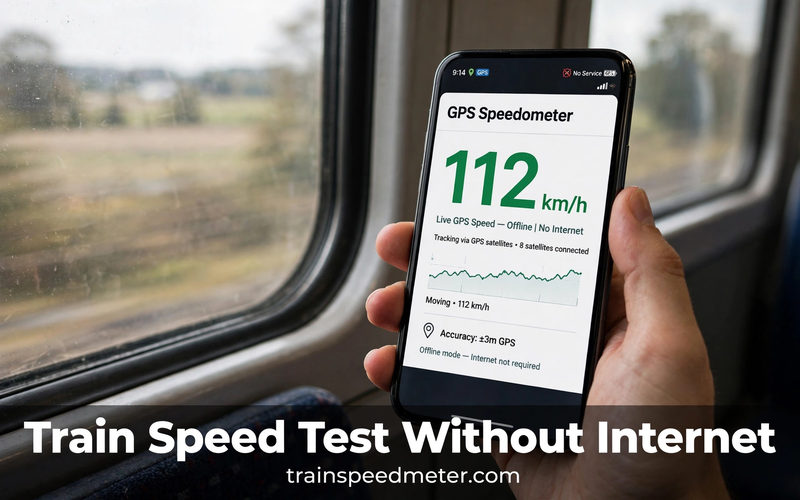
A train speed test without internet works because your phone’s GPS receiver talks directly to satellites, not to mobile towers. Load a GPS speedometer page or install an offline train speedometer app before you leave coverage, switch on location, and sit near a window. The speed appears live as a train speed checker offline, showing current, average and maximum speed in km/h or mph, even with no data, no Wi-Fi and no SIM.
Why Your Phone Can Measure Train Speed Without a Signal
Most people assume a speed test needs data. That is true for internet speed tests, but a train speed test is a different thing entirely. It measures how fast your body is moving over the ground, and your phone has a dedicated chip for that job.
Your phone’s GPS receiver listens to signals from satellites orbiting about 20,000 km overhead. The Global Positioning System is a one-way broadcast: satellites send out timing information, and your phone only receives. Nothing is uploaded, and no mobile connection is involved. That is why a GPS train speed meter offline works in a village station, on a mountain line or in a desert stretch with zero bars of coverage.
Speed itself is usually derived from the Doppler shift of those satellite signals. As you move toward or away from a satellite, the signal frequency changes very slightly, and the receiver converts that change into velocity. It is more stable than comparing one position dot to the next, which is why a moving train can show a clean speed even when the map location wobbles.
What You Need Before You Board
Preparation matters more than equipment. You need three things, and none of them cost money.
A phone with GPS. Practically every smartphone made in the last decade qualifies, including budget Android models. Tablets with GPS also work. Wi-Fi-only tablets usually do not.
A tool that runs offline. You have two routes: a browser-based GPS speedometer you open once and keep running, or an installed app that stores everything on the device. Both are covered below.
Location services switched on. On Android, set location mode to high accuracy or “GPS only” if your phone offers it. On iPhone, allow location access for the browser or app and choose “While Using.”
Step-by-Step: How to Check Train Speed Without Internet
This is the process that works consistently, whichever tool you pick.
- Load your tool while you still have a connection. At home or on the platform, open the Train speed meter page or your chosen app. A web tool must finish loading before coverage disappears. Once the page is open, speed calculation runs on the phone itself.
- Grant location permission. Tap Allow when asked. If you accidentally tap Deny, the speedometer will sit on 0 forever, and you will need to reset the permission in your browser’s site settings.
- Let the GPS lock before departure. Open the tool at the platform and wait for the accuracy indicator to settle. A fix acquired while stationary in the open is far quicker than one attempted in the middle of a moving coach.
- Place the phone by the window. Put it on the fold-down tray, a window ledge or your lap with the screen up. The antenna sits inside the phone, so exact orientation matters less than sky visibility.
- Start tracking after the train moves. Most tools show current, average and maximum speed. Starting after departure gives a cleaner average because station waiting time does not drag it down.
- Keep the screen or tab active. If the browser tab goes to the background or the phone sleeps aggressively, readings can freeze. Set the screen timeout longer, or keep the page in view.
The one thing to know about the first fix: if you switch on GPS for the first time in many hours with no data at all, a “cold start” can take a minute or more, because the phone has to download satellite orbit data directly from the satellites at a slow rate. Phones normally speed this up using assisted GPS over the internet. That is the real reason to open your tool before leaving coverage.
Browser Tool or Offline App: Which Should You Use?
Both approaches read the same GPS hardware, so raw accuracy is nearly identical. The difference is convenience and reliability.
A browser-based speedometer needs no installation, works on any phone, and takes ten seconds to start. The trade-off is that you must load it while connected, and a browser that closes the tab to save memory will lose your session. Adding the page to your home screen, when the tool supports it, makes it behave more like an app and reduces browser overhead.
An offline train speedometer app is installed once and needs nothing afterwards. Apps typically keep a trip history, record maximum speed and let you switch units. The trade-off is storage space, permissions and the occasional ad or paid upgrade. If you take long journeys regularly, an app is the steadier choice. If you travel occasionally, a browser tool is quicker.
| Feature | Browser GPS tool | Offline speedometer app | Manual calculation |
| Cost | Free | Free or freemium | Free |
| Installation | None | Required | None |
| Works with no data | Yes, after loading | Yes, fully | Yes |
| Live speed | Yes | Yes | No, average only |
| Trip history | Limited | Often included | Notebook |
| Best for | Occasional riders | Regular travellers | Backup method |
| Main weakness | Must load first | Ads or upsells | Low precision |
Best Free Ways to Measure Train Speed Using Your Phone
If you want to measure train speed using your phone with no spending, these routes cover nearly every situation.
Method 1: GPS speedometer web page
Open the page, allow location and start. This is the lowest-effort option and the one most first-time users prefer. Because it needs no install, you can also share the link with a travelling companion who wants to check their own phone.
Method 2: Dedicated GPS speedometer apps
Android and iPhone stores list plenty of train speedometer GPS apps. Look for apps that explicitly advertise an offline mode, show maximum and average speed, and request only location permission. An app asking for your contacts or microphone to display speed is a red flag. Read recent reviews before you commit, because features and ad behaviour change with updates.
Method 3: Fitness and cycling apps
Running and cycling apps record GPS speed too. They are a decent fallback when you have nothing else installed, though their interface is built for pace and not for train-scale speeds, and some will auto-pause when they think you are not exercising.
Method 4: The mile-marker stopwatch method
This old-school technique needs no electronics except a watch. Railways mark distance along the track with small posts, typically every kilometre or quarter mile. Time how long the train takes to pass two consecutive posts, then divide the distance by the time. For example, a one-kilometre gap covered in 30 seconds means 120 km/h (1 km in 1/120 of an hour). It is only an average over that stretch and requires sharp eyes, but it is a genuinely useful cross-check against your phone.
What Speeds You Should Expect to See
A live reading means little without context. Here is how common train types behave.
Metro and suburban trains accelerate and brake constantly, so you might see peaks of 60 to 90 km/h but an average well below that. Conventional express trains cruise much higher, and high-speed lines run in an entirely different range.
In India, premium services such as the Shatabdi, Rajdhani and Vande Bharat families run at higher sustained speeds, while the Gatimaan Express is among the country’s quickest, with a top speed of 160 km/h on its Delhi–Agra route. If you ride one of these, try the Shatabdi Express speed test or the Gatimaan Express speed test and compare your reading with the official top speed. For wider context, see how fast Indian trains run.
Internationally, Japan’s Shinkansen, France’s TGV and China’s high-speed network operate at roughly 250 to 350 km/h on dedicated track. Your phone will show these numbers just as faithfully, provided the signal holds, and it usually does on open high-speed corridors.
Why live speed rarely matches timetable speed
A timetable tells you the average between stations, including stops, slow zones and waiting at signals. GPS tells you what is happening this second. A train with a top speed of 130 km/h can legitimately average 70 or 80 km/h over a route. When the live reading is lower than expected, the cause is usually a speed restriction, a curve, a signal or a platform approach. It is not a faulty tool.
How Accurate Is Offline GPS Train Speed?
For ordinary conditions, very. According to GPS.gov, smartphones are typically accurate to about 4.9 metres in open sky for position. Speed readings are generally steadier than position, and most users see agreement within a few km/h of the true figure.
Several things push accuracy down:
- Metal-heavy coaches. Steel bodies and tinted glass weaken satellite signals, which is why the window seat matters so much.
- Station roofs and cuttings. Signal reflections confuse the receiver for a few seconds.
- Cheap or old phones. Lower-grade GPS chips struggle with fast-moving targets.
- Power-saving modes. Battery saver settings can throttle location updates.
In practice, a reading that jumps by 10 or 20 km/h for a moment usually settles on its own. Judge the trend over a couple of minutes instead of reacting to one frame. Peak numbers are the most prone to spikes, so treat a maximum speed as an estimate and not as a record.
Why the Speed Drops to Zero in Tunnels
GPS needs a clear line to the sky. A tunnel, an underground metro section or a deep cutting blocks it completely, and the reading either freezes or falls to zero. This is normal. There is nothing to fix, and nothing in your settings will bring satellites through rock.
The reading returns within seconds of emerging into the open. Some apps fill the gap by estimating from the last known speed, and others simply show the stale value. Neither approach can be called wrong, because the receiver has no new data.
Practical Tips From Real Journeys
A few habits make the difference between a frustrating test and a smooth one.
Choose the right side. On a double-decker or a train with large panoramic windows, the upper level gives the best reception. On older Indian coaches with window bars, a seat at an open window helps, though you should keep the phone secured and away from the edge.
Watch your battery. Continuous GPS uses noticeably more power than passive use. On a journey of more than two hours, carry a power bank. Dimming the screen helps more than any other single change.
Switch on airplane mode carefully. On most phones you can turn on airplane mode and then re-enable only location services, which saves power while keeping GPS alive. The behaviour varies between devices, so test it at home before you travel.
Pick your units. Indian and European timetables use km/h, while US and UK sources often use mph. Choose the unit that matches the document you want to compare against, or use a converter afterwards.
Respect railway rules. Keep the phone inside the carriage and do not lean out or stand in the doorway for a better signal. No speed reading is worth a fall.
Who Benefits Most From an Offline Train Speedometer
Rail enthusiasts use it to verify a service’s real top speed and log runs on favourite routes.
Students and teachers turn a commute into a live physics lesson on velocity, acceleration and averages.
Frequent commuters check whether delays are being made up or whether speed restrictions are slowing a section.
Travel bloggers and YouTubers capture credible on-screen speed overlays for journey videos.
Curious families keep children entertained by guessing the next peak.
Privacy and Safety Considerations
A well-built GPS speedometer processes location on your device and does not upload it. That is worth confirming before you trust any tool. Check the permission prompts, favour tools that state clearly that no data leaves the phone, and avoid anything that asks for permissions unrelated to speed.
One more limit is worth being honest about. A phone-based speed test is a hobby and information tool. It is not an official measurement and should never be used to challenge a railway’s operating data, a driver’s performance or a safety report.
Common Problems and Quick Fixes
| Problem | Likely cause | Fix |
| Speed stuck at 0 | Location off or denied | Enable location and reset the site permission |
| Reading freezes | Tab went to background | Keep the page open, lengthen screen timeout |
| Wildly low or high values | Weak satellite lock | Move closer to the window, wait a minute |
| Slow first reading | Cold GPS start | Open the tool before leaving coverage |
| Battery draining fast | Constant GPS and bright screen | Lower brightness, use a power bank |
| Different result from a friend | Different phones and seat positions | Compare averages over several minutes |
Make Your Next Journey a Proper Speed Test
A train speed test without internet needs only a GPS-enabled phone, a tool opened before the signal fades, and a seat with a view of the sky. Prepare at the station, grant location access, wait for the lock, and let the satellites do the rest. Whether you pick a browser tool or an installed app, you get live, average and top speed on any route, however remote. Try it on your next trip and compare what you see with the timetable.
Frequently Asked Questions
Can I check train speed without internet or mobile data?
Yes. Your phone’s GPS receives satellite signals directly and needs no mobile data, Wi-Fi or SIM. The only catch is that a web-based tool must be opened and fully loaded while you still have a connection. After that, a train speed test without internet keeps working for the whole journey.
Does a train speed checker offline work with airplane mode on?
Usually, yes. Airplane mode switches off mobile and Wi-Fi radios, but most phones still let you keep location services active or re-enable GPS afterwards. Behaviour varies by brand, so try it at home first. If speed reads zero, turn location back on manually and check your app’s permissions.
Which offline train speedometer app is best for beginners?
Choose a simple app that lists an offline mode, shows current, average and maximum speed, and asks only for location permission. Read recent reviews for ads and bugs. If you do not want to install anything, a browser tool you open once at the platform is the easiest starting point.
How do I measure train speed using my phone if I have no app?
Open a GPS speedometer web page before you lose signal, allow location access and keep the tab open. If you prefer no phone at all, time the train between two distance markers beside the track and divide distance by time. That gives you an average speed for that stretch.
How accurate is a GPS train speed meter offline?
In open sky, most phones read within a few km/h of the true speed. Accuracy drops in metal coaches, cuttings and under station roofs. Sit by a window and judge the reading over a couple of minutes rather than a single second, especially when comparing top speeds.